Navigating the world of Roblox and wondering "can you save Roblox progress" is a common concern for many gamers, especially those juggling busy lives. We understand the frustration of losing hard-earned achievements or valuable in-game items due to a misunderstanding of how game data is handled. This comprehensive guide is designed to provide clear, actionable insights into Roblox's automatic saving mechanisms, ensuring your playtime is always productive. Whether you're a parent trying to understand your child's favorite platform, or an adult gamer looking to maximize your limited gaming sessions, understanding game progress is key. We'll demystify how individual game developers manage saves, what happens during disconnections, and how your account ties everything together across devices. Get ready to game smarter, not harder, and never worry about losing your progress on Roblox again.
How does Roblox actually save my game progress?
Roblox saves your game progress primarily through a system called DataStores, which are managed by the individual game developers. When you play a specific Roblox experience, the developer's code decides what information (like your level, items, or currency) needs to be stored and then sends it to Roblox's cloud servers. This means your progress is tied to your Roblox account, not the device you're playing on, allowing for seamless continuation across PC, mobile, or console.
Is my Roblox game progress tied to my account or my device?
Your Roblox game progress is fundamentally tied to your **Roblox account**. This is a crucial distinction. It means that as long as you log in with the same Roblox username and password, your saved data will be accessible from any device capable of running Roblox. This cloud-based saving ensures your hard-earned achievements, items, and levels follow you wherever you play, providing flexibility for gamers on the go.
What happens to my progress if my internet disconnects while playing Roblox?
If your internet disconnects while playing Roblox, any progress made since the last successful save might be lost. Most games save data at regular intervals or specific checkpoints. A disconnection prevents the game from communicating with the server to record new actions. Once reconnected, you'll likely revert to your last saved state. This highlights the importance of a stable internet connection for critical gameplay moments.
Can I manually save my game progress in Roblox?
Generally, players cannot manually save their progress in Roblox games in the traditional sense, like hitting a 'Save Game' button. Saving is almost always handled automatically by the game's developer. Some developers might integrate an in-game 'Save' button, but even then, it triggers an automatic server-side save. The core principle remains automatic, account-linked saving.
Why do some Roblox games seem to save progress better than others?
The perceived difference in saving reliability across Roblox games comes down to how each individual developer implements their saving mechanisms using Roblox's DataStore API. Some developers create very robust systems with frequent auto-saves, while others might save less often or have specific triggers. The quality and thoroughness of a game's saving script directly impact how consistently your progress is retained.
Will my Robux purchases and game passes save automatically in Roblox?
Yes, absolutely. All Robux purchases, including game passes, developer products, and in-game items bought with Robux, are automatically and securely tied to your Roblox account. These entitlements are stored on Roblox's servers and will persist across all your play sessions and devices. You never have to worry about losing these valuable purchases due to a save error or device change.
How can I check if a specific Roblox game saves my progress?
The most straightforward way to check if a Roblox game saves your progress is to play for a bit, make some visible progress (e.g., gain a level, collect an item), then leave the game and rejoin. If your progress is retained, it's saving correctly. Additionally, check the game's description, in-game tutorials, or community pages; developers often provide details on how their specific game handles saving player data.
In the bustling world of gaming, where our leisure time is often a precious commodity, few things are as disheartening as losing hard-earned progress. For many busy US gamers, balancing careers, families, and personal lives, every minute spent in a game like Roblox counts. The nagging question, "can you save Roblox progress?" often arises from past experiences with other platforms or the sheer diversity of experiences within Roblox itself. You pour hours into building, exploring, or leveling up, only to wonder if all that effort will vanish with a single logout or a sudden connection drop.
We get it. You want to unwind, enjoy some fun with friends, or maybe even build some new skills without the constant worry of data loss. With 87% of US gamers regularly diving into virtual worlds and spending an average of 10+ hours a week, the need for reliable game saving is paramount. Roblox, a platform where creativity and community thrive, handles progress a bit differently than a typical single-player game. The good news? For the most part, your Roblox progress is saved automatically. But understanding *how* and *why* it works that way is key to a smooth, stress-free gaming experience. This guide will cut through the confusion, offering practical solutions and insights so you can focus on what matters: having fun and making progress.
How Does Roblox Automatically Save Your Game Progress?
When you jump into a Roblox experience, your progress is almost always saved automatically. This isn't handled by Roblox Corporation directly for every single game, but rather by the individual game developers themselves. They build specific saving mechanisms into their games, often utilizing Roblox's data store services. Think of it like a cloud save system specific to that particular game.
Most Roblox games save your progress on the server side, meaning your data isn't stored directly on your device but on Roblox's servers. This is fantastic because it means you can pick up where you left off from any device – your PC, tablet, or phone – as long as you're logged into the same Roblox account. This server-side saving is what allows for the seamless cross-platform play that many Gen Z and Millennial gamers, who often switch between mobile and PC, have come to expect and appreciate.
Do All Roblox Games Save Progress the Same Way?
While the underlying technology (Roblox's data stores) is consistent, the *implementation* of saving varies significantly from game to game. This is a crucial point many players overlook when asking "can you save Roblox progress?" Some developers might save your data every few minutes, others only when you reach a checkpoint, complete a level, or leave the game. Some games might have very detailed saving, tracking every item and stat, while simpler experiences might only save high scores or currency.
It's always a good idea to check the game's description, in-game instructions, or community forums if you're concerned about how a specific game saves. Developers usually make an effort to communicate their saving methods, especially for complex RPGs or simulator games where progress is vital. This developer-specific approach means that while Roblox provides the tools, it's up to the creators to use them effectively.
What Happens if You Lose Connection While Playing Roblox?
A sudden internet outage or Wi-Fi drop can be a gamer's worst nightmare, especially when you're deep into an experience. If you lose connection while playing Roblox, what happens to your progress largely depends on when the game last saved your data. Because most games rely on server-side saves, a disconnection means the game can no longer communicate with the server to record new progress.
In many cases, you might lose any progress made between your last successful save and the moment of disconnection. For instance, if a game saves every five minutes and you disconnect after four minutes of intense gameplay, those four minutes of progress might be gone. Some robust games might have a temporary local cache that tries to sync upon reconnection, but this is less common. To minimize frustration, consider playing in stable network environments, especially during critical game moments.
Can Developers Control How Progress is Saved in Their Roblox Games?
Absolutely, developers have significant control over how progress is saved within their individual Roblox experiences. This autonomy is a cornerstone of the platform's creator-driven model. They use Roblox's DataStore API to store and retrieve player data, which can include anything from character stats, inventory items, currency, completed quests, to custom build data.
This means developers decide:
- When to save: Automatically at intervals, at specific checkpoints, upon leaving the game, or even manually through an in-game save button.
- What to save: Which pieces of player data are crucial to store and restore.
- How to handle data integrity: Implementing systems to prevent data corruption or loss.
How Do I Know My Roblox Progress is Being Saved?
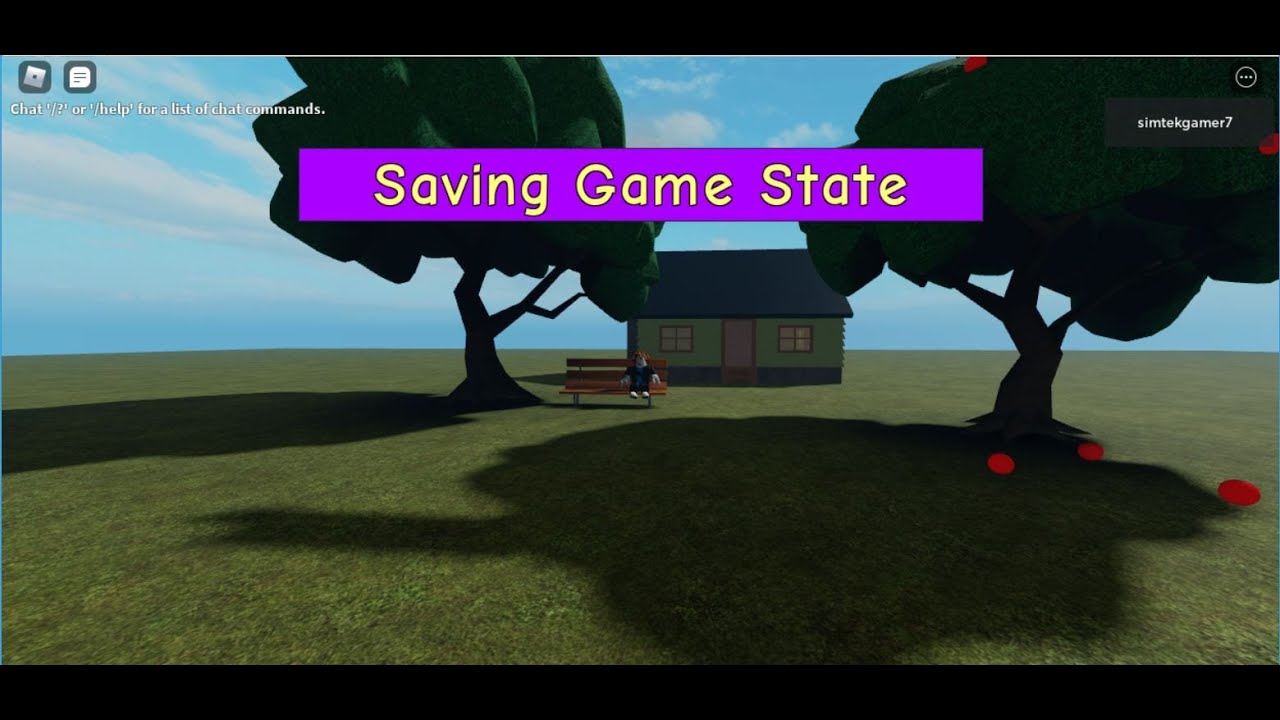
For most players, the saving process is invisible and automatic. You rarely see a "Saving Game..." message pop up. However, there are a few ways to infer that your progress is being saved:
- Login and Check: The most reliable way is simply to exit the game, then log back in later (or on a different device). If your character stats, items, or position are as you left them, the game is saving.
- In-Game Indicators: Some developers will include subtle indicators, like a small icon briefly appearing, or text in the chat box stating "Game Saved."
- Developer Information: As mentioned, check the game's description or community pages for explicit details on its saving system.
- Frequent Changes: If you notice your in-game currency, levels, or inventory consistently persist between sessions, you can be confident the saving is working as intended.
For adult gamers who value efficiency, knowing this provides peace of mind, allowing you to quickly hop in for a short session without fear of losing your efforts.
What About In-Game Purchases and Saved Items in Roblox?
This is where the reliability of Roblox's underlying platform really shines. Any Robux you spend on in-game items, game passes, or developer products are securely tied to your Roblox account. These purchases are almost universally saved automatically and are designed to persist across all your play sessions and devices within that specific game. This is a major advantage and a key reason why free-to-play games with in-app purchases, like many on Roblox, thrive.
When you buy a game pass, for example, the entitlement to that pass is recorded on Roblox's servers under your account. The game then queries this information when you join, granting you the associated benefits. This robust system means you don't have to worry about losing your premium items or currency due to a local save file error or device change. It's a critical component for building trust, especially in a platform driven by user-generated content and microtransactions.
Can I Transfer My Roblox Progress to Another Account?
Unfortunately, no. Your Roblox game progress, including items, stats, and achievements, is strictly linked to the specific Roblox account you were using when that progress was made. There is no official feature or mechanism to transfer progress from one Roblox account to another. This is a fundamental security measure designed to protect user data and prevent fraud.
While it might be inconvenient if you wish to consolidate accounts or move progress, it ensures that your hard-earned achievements remain uniquely yours. This policy is standard across most major gaming platforms and protects the integrity of in-game economies and player efforts. Therefore, it's crucial to always use the same account for consistent progress tracking.
Are There Any Common Issues with Roblox Game Saving?
While Roblox's saving system is generally reliable, players can occasionally encounter issues. These are often game-specific rather than a platform-wide problem. Common issues include:
- Game-Specific Bugs: A bug in a developer's code might prevent data from being saved correctly. Developers usually address these quickly.
- Server Load: During peak times, very high server load could potentially cause brief delays or failed saves, though this is rare for critical data.
- Corrupted Data: Extremely infrequently, a player's data might become corrupted. Roblox has systems to mitigate this, but it can happen.
- Outdated Game Version: Playing an older, cached version of a game (which shouldn't happen automatically but can in rare edge cases) might not interact with the latest save data.
If you encounter persistent saving issues in a particular game, the best course of action is to report it to the game's developer. They are the primary custodians of their game's specific save data.
Tips for Ensuring Your Roblox Progress is Secure.
While the "can you save Roblox progress" question mostly resolves to automatic saves, a few best practices can help ensure your gaming experience is as smooth and secure as possible:
- Stable Internet Connection: Play on a reliable Wi-Fi or wired connection to minimize disconnections during crucial moments.
- Account Security: Enable Two-Step Verification (2SV) on your Roblox account. A compromised account means compromised progress.
- Report Bugs: If you suspect a game isn't saving correctly, report it to the game developer through their official channels.
- Understand Game Mechanics: Read game descriptions and in-game tutorials to understand how individual games handle saving.
- Avoid Unauthorized Tools: Using third-party tools or exploits can sometimes interfere with game data and lead to progress loss or account bans.
By following these tips, you're not just ensuring your progress is safe; you're also contributing to a healthier and more secure gaming environment for everyone.
What Role Do Cloud Saves Play in Roblox Progress?
Cloud saves are essentially the backbone of how your Roblox progress is managed. When we talk about "server-side saving" within Roblox, we're talking about a form of cloud saving. Instead of your game data residing solely on your local device (like a classic PC game's save file), it's stored remotely on Roblox's vast network of servers.
This cloud-based approach offers several significant advantages:
- Cross-Platform Access: Play on your PC, then seamlessly continue on your tablet or smartphone. Your progress follows your account, not your device.
- Data Redundancy: Cloud storage is typically backed up, meaning your data is less susceptible to loss from a single point of failure (like a hard drive crash).
- Developer Control: It provides developers a centralized, robust system to manage and update player data.
- Prevents Cheating: Local save files can sometimes be tampered with. Cloud saves make it much harder for players to cheat by manipulating their progress.
For gamers who juggle multiple platforms and value accessibility, cloud saves are a game-changer, perfectly aligning with current mobile gaming dominance and cross-play trends.
FAQ Section
Does quitting a Roblox game save my progress?
Generally, yes. Most Roblox game developers program their games to save your progress automatically when you leave an experience. However, this is dependent on the specific game's design, as some might require reaching a specific checkpoint or using an in-game save feature before exiting. It's always best to play it safe and exit gracefully.
Can I backup my Roblox game progress manually?
No, there is no official feature within Roblox for players to manually backup their game progress files. All player progress is stored server-side by the individual game developers using Roblox's DataStore system, making manual local backups impossible for users. This ensures consistency and security across devices.
What if my game progress resets in Roblox?
If your game progress resets, it's usually due to a bug within that specific game or a rare data corruption issue. First, try rejoining the game. If the problem persists, report it directly to the game's developer. Ensure you are logged into the correct Roblox account, as progress is account-specific.
Is Roblox progress linked to my device or my account?
Roblox progress is strongly linked to your **Roblox account**. This means you can log into your account from any compatible device (PC, mobile, console) and access your saved game data. It does not store progress locally on a single device, providing seamless cross-platform play.
Do private servers save progress in Roblox?
Yes, progress in private servers generally saves the same way it does in public servers. The saving mechanism is tied to the game experience itself and your Roblox account, not whether the server is public or private. Any progress made within a private server should persist.
How often does Roblox save game data?
The frequency of saving game data in Roblox is determined by the individual game developer. Some games might save every few seconds, others at specific intervals (e.g., every 5 minutes), or only at key points like completing a level or leaving the game. There is no universal Roblox-wide save frequency.
Why did my Roblox progress disappear or not save?
Progress disappearing or not saving in Roblox typically stems from a few reasons: a bug in the specific game's saving script, a temporary server issue preventing data writes, or playing on an alternate account. Always verify you're on the correct account and consider reporting persistent issues to the game's developer for investigation.
***
So, can you save Roblox progress? The definitive answer is yes, almost always automatically and securely tied to your account. Understanding that individual game developers control the 'how' and 'when' of saving is key to navigating the diverse Roblox universe. You can game with confidence, knowing your efforts are preserved. This allows you to focus on the fun, the creativity, and the social connections that make Roblox such a popular platform for millions of gamers, especially those balancing busy lives.
What's your biggest gaming challenge when it comes to saving progress in any game? Comment below!
Roblox progress is typically saved automatically by individual game developers. Most games utilize server-side saving, linking progress to your Roblox account. Losing connection may result in temporary progress loss until reconnection, depending on the game. In-game purchases are generally tied to your account and persist across sessions. Understanding developer specific saving methods is crucial.
35



How To Save Your Game In Roblox Studio Tutorial YouTube . How Do I Save My Game On Roblox Studio Save Progress In Roblox YouTube . Twisted Roblox Codes March 2026 Anime Duelist Codes.webp. Roblox Codes July 2026 All Active Game Codes And Free Rewards The Click Roblox Codes May 2026 . How To Save Data In Roblox Studio Save Progress In Roblox YouTube


How To Save Your Progress In Roblox Games In SECONDS YouTube . MSN Games Not Saving Progress 2026 Fixes Solutions Roblox Error 277 Thumbnail 1024x701 . Roblox 2026 YouTube Oar2 . Progress Update 1 10 2026 Games Studio 2026 01 10. Can You Return Roblox Items A 2026 Guide



Roblox Gift Cards Removed From Microsoft Rewards 2026 Roblox Moderation System Changes Impact 2026 1024x572 . How To Change Server Region In Roblox 2025 Game Voyage Vdryz4h4 1024x576 . Roblox Safety Snapshot October Roblox. Roblox Roll To Defend Codes July 2026 Defend Your Base And Save Up Roblox Roll Defend Codes July 2026 . How To Save Progress In Your Roblox Game YouTube



Please Help Save Progress And Stage Scripting Support Developer . How To Restore Levels On Your Game Roblox Images. Roblox AI Script Generator Auto Generate Luau Code In 2026 Obby Roblox Ai Script Generator Mid.webp. Slayers Unleashed Codes July 2026 Dexerto Slayers Unleashed Codes Feature . Roblox TikTok Music ID Codes Mini Cup Codes.webp


Miners Haven Codes July 2026 Dexerto Miners Haven Codes . Bunny Tycoon Codes July 2026 Earn Cash Coins Bunny Tycoon Codes . Slayer Online Codes July 2026 Dexerto Slayer Online Codes 1 . Mini Rome Empire Codes July 2026 Deltia S Gaming Desktop Screenshot 2026.07.14 17.45.57.81 . Roblox Roll An Anime Codes Roll An Anime Codes



Adopt Me Codes July 2026 Roblox Adopt Me . Roblox My Prison Codes July 2026 Pocket Gamer An Image Of Roblox My Prison Jpg 820 . All Working Roblox Party Codes June 2026 Time To Grab Some Gems All Working Roblox Party Codes . Roblox Rivals Ranks Complete Ranked Guide ELO Tips Rivals Hub Article 02 02 . Catch And Tame Codes July 2026 Dexerto Catch And Tame Codes




Mini Empires Codes July 2026 Dexerto Mini Empires Codes . Roblox Volleyball Legends Codes June 2026 Unleash Your Most Powerful Roblox Volleyball Legends Codes June 202 . Anime Paradox Codes July 2026 Dexerto Roblox Anime Paradox Codes . Merge A Nuke Codes July 2026 Dexerto Merge A Nuke Codes . Fix It Up Codes July 2026 Dexerto Fix It Up Codes